
Kathryn Showalter
Hi, I’m Kathryn
Instructional designer · Senior learning specialist

Designing for the moment performance matters.

I create e-learning and blended training that helps frontline teams make new systems, processes, and service skills second nature.

Kathryn Showalter, smiling, in a black sweater
How I work:Performance needsRealistic practiceClear job supportFeedback and iteration
Selected work

Instructional design case studies

Examples of how I design for frontline teams, from building a course to supporting the rollout of a new system.

Storyline development and reinforcement

Admin systems training redesign

When the organization moved 400+ employees onto a new administration platform, each department needed practice with the parts of the system they actually used. I designed and built the original course in Articulate Storyline, then used a department-by-department needs analysis to redesign it into role-specific modules with simulations, practice exercises and job aids.
Storyboard design

Turning onboarding procedures into decisions

I reviewed procedure materials and developed a Storyline storyboard that organized practice around a decision staff make on the job. Short exercises led to a complete case where learners reviewed the available information and chose a next step.

Change enablement · Systems training

Preparing experienced employees for a new contact center platform

A contact center technology transition changes more than the interface. Employees must learn new controls while continuing to manage customer conversations, service expectations and established workflows. The challenge was to prepare experienced staff for the new platform without treating them like new hires.

Learning leadership · Blended learning

Leading a regional learning rollout under changing operational demands

As the California learning lead, I supported a time-sensitive training initiative involving changing operational requirements, multiple stakeholders and a compressed development schedule. The challenge was to translate complex process information into usable instruction while coordinating the people, content and decisions needed for delivery.

Case study 01

Admin systems training redesign

My role
Departmental needs analysis, original course design, hands-on Articulate Storyline development, department-specific redesign and post-launch reinforcement.
Design
I started with a needs analysis, meeting with each department to understand how their teams used the platform and to identify gaps in the existing training. Using those findings, I paired hands-on practice with knowledge checks so employees could work through the tasks specific to their role and check their understanding.
Iteration
I used feedback at 30, 60, and 90 days to identify recurring gaps and develop targeted microlearning for three of them.
Outcome
Created over 30 custom simulations, practice exercises and job aids to onboard 400+ employees on the new administration platform, equipping all users to perform core job functions without disruption.

Storyboard sample: Practice a handoff

This sample illustrates the practice and feedback structure.

1 · Set the scene

A teammate sends a request without the information you need to complete it.

2 · Ask for a decision

Choose whether to advance the request, ask for the missing information, or escalate.

3 · Explain the consequence

Asking for the missing information gives the next person enough context to continue without sending the request back.

Case study 02

Turning onboarding procedures into decisions

My role
Procedure review, instructional sequencing, scenario writing and Storyline storyboard development.
Rationale
Practice the decision rather than memorize the procedure.
Outcome
The completed storyboard transformed written onboarding procedures into a development-ready Articulate Storyline course design. Each procedural step was connected to a decision employees encounter on the job, with learning activities progressing from short practice exercises to a comprehensive case scenario. The storyboard established the screen content, learner interactions and targeted feedback needed to support practical application rather than procedural memorization.
Evaluate
Proposed measures: decision accuracy, appropriate escalation and documentation quality.

Storyboard sample: Review an onboarding request

The rows show how review cues lead to different choices in an onboarding workflow.

What the learner seesDecision to practice
All required information is present.Move the request to the next step.
A required detail is missing.Ask for the specific information needed.
The request falls outside the standard process.Route it for further review.
Case study 03

Preparing experienced employees for a new contact center platform

My role
I learned the new phone platform, served as a system champion, and developed training and change communications for existing contact center employees.
Design strategy
I connected familiar workflows to the new system, helping employees understand what was changing and how it affected their daily responsibilities. My focus was on transferring existing service skills to a different technology environment.
Deliverables
Platform training and employee communications supporting the transition.
Evaluation
For a rollout of this type, I would assess independent task completion, recurring support questions and employee confidence. These are recommended measures, not reported project results.
Recreated design sample · Workflow mapping

Translate familiar tasks into new-system behaviors

A sample of how I would organize platform training around the work employees already understand, rather than a tour of every feature.

Existing responsibilityNew-system practiceReadiness check
Manage availabilityLocate and select the appropriate status before receiving calls.Choose the correct status for a given work situation.
Transfer a customerPractice locating a destination and completing a supported handoff.Complete the transfer without losing the customer or relevant context.
Complete after-call workPractice recording the interaction and returning to availability.Finish the workflow with accurate documentation.
Recreated learner practice

Keep the customer connected

A customer needs help from another department. You are using the new platform for the first time. What should you do before completing the handoff?

Try it →
Case study 04

Leading a regional learning rollout under changing operational demands

My role
I coordinated two instructional designers, partnered with operations and subject matter experts, managed schedules and dependencies, and supported delivery planning as requirements evolved.
Design strategy
The team paired live virtual instruction with job aids. The live session provided a shared learning experience; the job aids gave employees a reference they could use when performing the work independently.
Execution
Two instructional designers developed multiple resources and job aids within approximately one week. I coordinated the work and supported alignment with operational stakeholders.
Outcome
The first virtual session received five-star learner survey feedback. This is evidence of the initial learner experience, not a verified improvement in operational performance.
2Instructional designers coordinated
~1 weekInitial resource development
5 starsInitial session survey feedback
Recreated project planning sample

From operational request to frontline readiness

This illustrative delivery framework shows how I would structure a rapid rollout and make ownership visible.

  1. 01Clarify scope and priorityConfirm the audience, expected job behaviors, business urgency and unresolved process questions with operations.
  2. 02Coordinate developmentAssign design work, identify SME review dependencies and sequence materials around the highest-priority tasks.
  3. 03Prepare for deliveryValidate procedures, align facilitator guidance and confirm that employees can access supporting resources.
  4. 04Deliver and reinforcePair virtual instruction with practical references and capture questions that reveal remaining gaps.
  5. 05Evaluate and iterateUse learner feedback and operational evidence to recommend targeted follow-up rather than automatically repeating the full session.
Recommended evaluation plan

Measure beyond attendance

EvidenceWhat it tells us
Learner surveyPerceived relevance and clarity; initial five-star feedback was reported.
Scenario or task checkWhether employees can apply the process correctly before independent work.
Supervisor observations and case reviewsWhether trained behaviors transfer to daily work.
Recurring questions, rework and quality trendsWhere reinforcement or process clarification may be needed.

The last three measures are proposed follow-up methods; results are not claimed.

Fictional work sample

What would you say first?

Try a short fictional service scenario to see how I write choices and feedback for frontline learners.

Learning objective

Given a question about an unexpected charge, choose an opening response that acknowledges the concern and offers a clear next step.

Pick a response →
Member at check-in

“I just got charged again. I thought I froze my membership. Can you fix this?”

Performance support

Tools for the moment of need.

Two recreated examples of how I support employees beyond formal training.

Job aid · Customer care

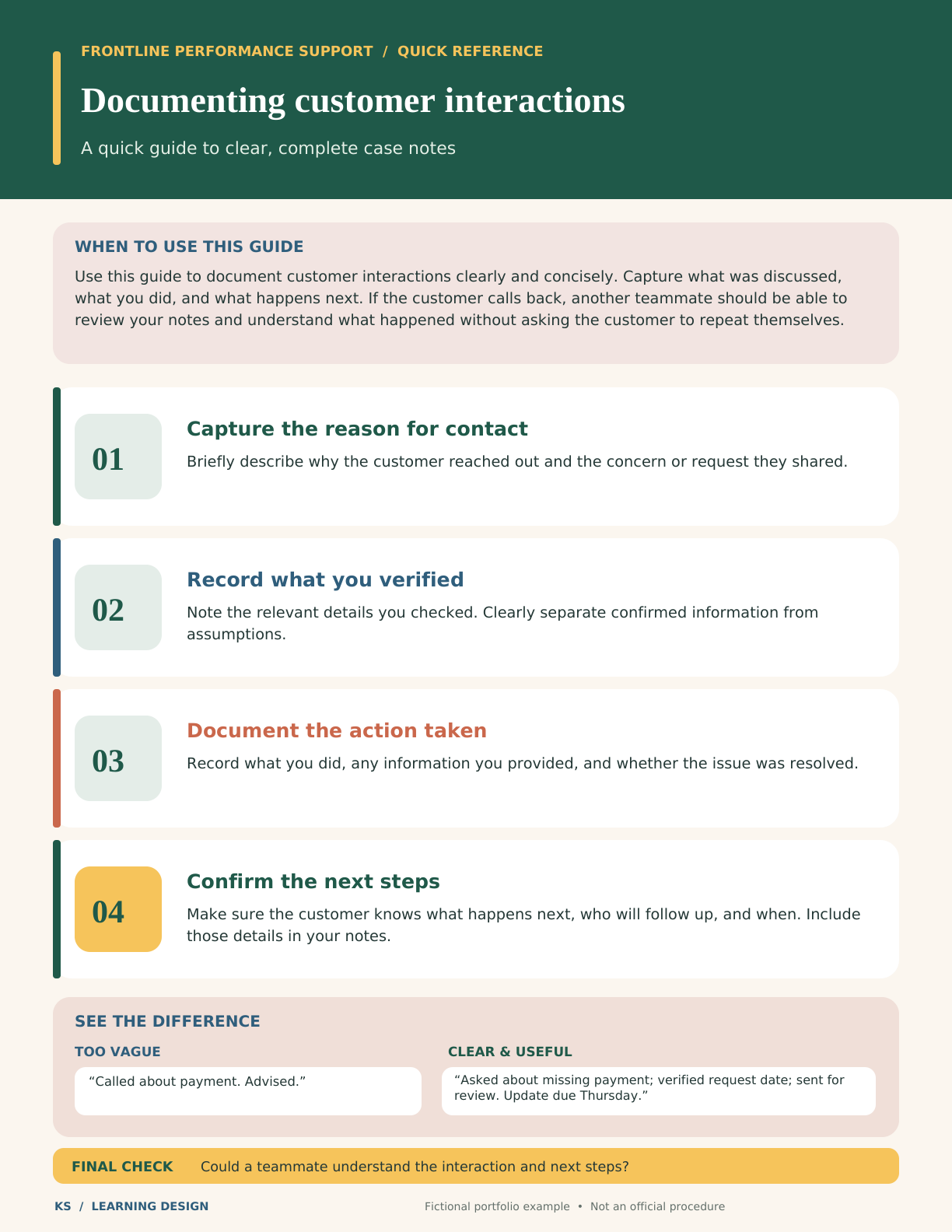
Documenting customer interactions

Use this guide to capture clear, concise notes so the next teammate can understand what happened and continue helping the customer.

  1. Capture the reason for contactWhat does the customer need?
  2. Record what you reviewedInclude relevant findings, not unnecessary personal details.
  3. Document the action takenExplain what was completed or remains unresolved.
  4. Confirm the next stepsMake sure the customer knows what happens next and record any commitments.

Before: Customer called about billing. Sent for review.

After: Customer questioned a charge after requesting a membership freeze. Reviewed account history and routed the charge for billing review. Explained that the charge remains under review and confirmed the next contact step.

Print / save job aid (PDF) (opens in a new tab)
Infographic · Performance consulting

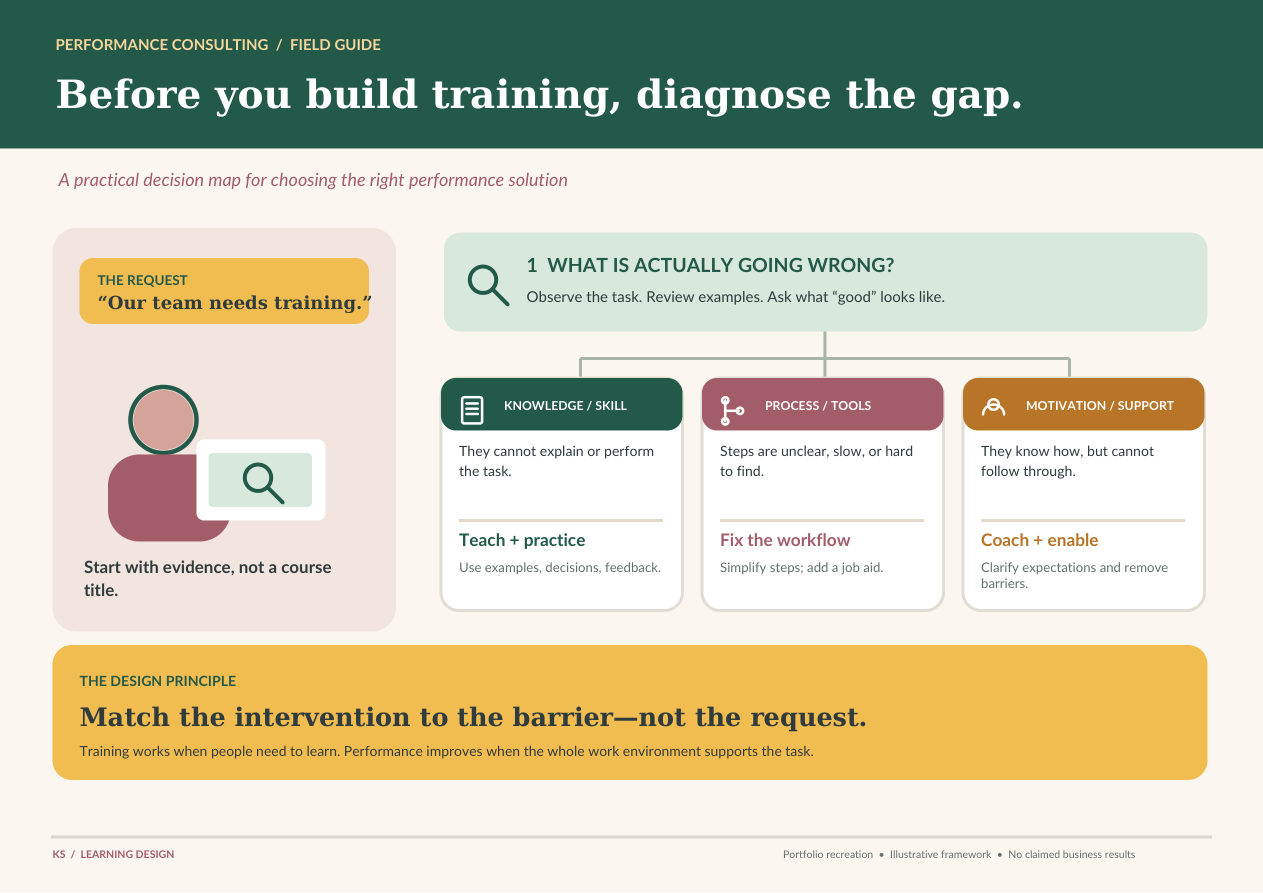
Before you build training, diagnose the gap.

Start with the expected behavior, observed performance and evidence of what is preventing success.

01 · Knowledge or skill

Can employees explain and perform the task? If not, consider practice, coaching or training.

02 · Process or policy

Are expectations and ownership clear? If not, partner with the process owner.

03 · Systems or access

Can employees complete the task with available tools? If not, address the barrier with the system owner.

Validate the solution: Review case samples, employee feedback and quality trends before and after implementation.

Print / save infographic (PDF) (opens in a new tab)
My approach

Make it useful. Make it usable.

Learning succeeds when people know what to do in the moment that matters.

Find the real need

I ask what employees should be able to do and where the work breaks down. If they lack practice, I design for that skill. If unclear instructions or a system issue are getting in the way, I raise those with the process owner.

Practice the decision

I use scenarios, role plays, and checks that resemble the actual work, supported by facilitation where discussion and feedback help.

Support the job

Job aids, SOP-based references, and short reinforcement help employees apply learning after a session ends.

About me

I understand the learner’s side of the work.

I’ve led frontline teams myself

Before spending nearly a decade in corporate learning, I led customer care and sales teams. That frontline experience is my north star as a designer. I know what it feels like to navigate a complicated system with a customer on the line—so I prioritize plain language, real-world scenarios, and just-in-time job aids people can pull up while they’re actually working.

In my current role as a Senior Learning Specialist, I align stakeholders, fellow designers, and operational partners to turn complex processes into intuitive, practical employee experiences.

Core capabilities

What I bring to an L&D team

Instructional Strategy

  • Needs Analysis
  • Blended Learning
  • Microlearning
  • Performance Evaluation

Enablement & Leadership

  • Stakeholder Alignment
  • Program Management
  • Virtual Facilitation
  • Frontline Coaching

Authoring & Tools

  • Articulate Storyline
  • Adobe Captivate
  • Just-in-Time Job Aids
Let’s connect!

Let’s make learning practical.

Interested in my process or a deeper walkthrough of one of these projects? I’d be glad to talk through the decisions behind the work.

Email Kathryn